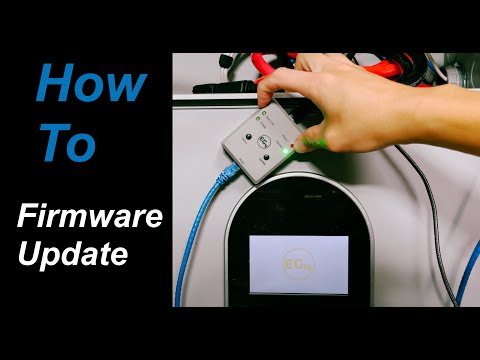
EG4 Battery Firmware Adapter Review & Tutorial (2025) – Firmware Update Made Easy?
📦 Products Featured in This Video
EG4 Electronics
EG4 Battery Firmware Adapter
$43.99
Buy on Signature Solar →
Affiliate link — we may earn a commission if you purchase through this link, at no extra cost to you.
Troubleshooting note from this video
🔗 Links Mentioned
Affiliate link — we may earn a commission if you purchase through this link, at no extra cost to you.
📝 Description
Affiliate link — we may earn a commission if you purchase through this link, at no extra cost to you.
📦 Buy your EG4 Battery Firmware Adapter here ➝ https://signaturesolar.com/eg4-battery-firmware-adapter?ref=bkpkbxde
In this video, we put the **EG4 Battery Firmware Adapter** to the test — checking out its design, compatibility, and real-world performance when updating EG4 lithium battery firmware.
⏱️ Timestamps:
0:00 Intro & what's included
0:45 Unboxing – cables, LEDs, USB‑C/Ethernet ports
2:30 Compatible batteries: WallMount 280Ah (indoor/outdoor), LL‑S V2, LifePower4 V2 (NOT V1)
3:15 Setup on Mac/Windows/Linux via USB‑C thumb drive mode
4:10 Attempting RS‑485 update — troubleshooting fault codes
7:00 Switching to Battery‑Com (.hex) via RS‑232 — success indicator
8:45 Final thoughts: polished design ‑‑ but firmware checking UX still needs improvement
✔️ Perfect for anyone with EG4 systems seeking an easier, more reliable firmware update method.
🔧 Also check out these accessories from Signature Solar:
• **EG4 RS232 Firmware Update Cable – LL** (for RS‑232-only updating)
• **EG4 Ethernet Monitoring Adapter** — add network visibility to your EG4 setup
✅ Why we recommend it: At only \$46.99 with a 3‑year replacement warranty, this adapter turns a tricky firmware update into a one‑button experience. Compatible with most current-gen EG4 batteries and works on Linux/Mac/Windows via USB‑C.
⚠️ Not compatible with LifePower4 V1 / LL‑V1 or GYLL models.
Leave a comment below if you’ve had errors like RS‑485 faults — I’d love to compare notes!
#EG4 #BatteryFirmware #SolarTech #FirmwareUpdate #EG4Battery #SignatureSolar #SolarReview #HomeBattery #DIYSolar #Victron #OffGrid
firmwareadapterbatteryupdatecomcompatibleusbviabatteriescheckingdesigndiscordethernethttpsincluded
🎬 Related Videos
📝 Video Transcript
Hey, what's guys? Welcome back to the channel. This episode I'll talk to you about this. If you don't know what this is, this is the battery updater version two from EG4.
And what it really does is it upgrades or updates your battery firmware with the touch of a button after you set it up. So, this is nothing new, mainly because they've already had something like this before, which is the V1 model, which I do have right here, which I've used a few times before. Uh, this had a few issues mainly because you weren't you weren't really able to put the firmware on here and then upload it to the uh, battery. At least from my from my experience, I wasn't able to do that.
And somebody correct me if I'm wrong here, but it was very limited. And this was almost of like a prototype. Uh, but it did works cuz I did I was able to update some of my batteries using this device. And the best thing about this is if you called EG4 and you said you have issues with your batteries and stuff like that, they will give you a code that you could use to pretty much get one of these for free.
So, they did solve a problem, but they've learned some lessons and they've made some upgrades to this model and now it actually looks more polished, right? because it's, you know, EG4 grade, comes in a nice box, gives you cables, has LEDs, buttons, and you can load firmware onto this before uh trying to update your battery, which is huge because that makes this thing so much more versatile. And it uses USBC and you can update using an Ethernet cable. So, we're going to dive a little bit more into this.
So, if you want to know more about this, stick with us. All right. So, let's dive into here just a little bit, mainly because I've already taken this out and I've uploaded firmware on here. So, we can go ahead and show you uh more about this after trying to use it.
Unfortunately, I have not updated the battery firmware yet, mainly because the batteries I have already have updated firmware. So, I think I have one left that doesn't have the latest firmware. So, I'm going to try to use this on that in just a little bit. But, let's talk about the packaging.
When you get the packaging, it comes in this nice little box, almost like a frustrationfree type packaging. Little QR code you could scan to pretty much get, you know, information about this device. It comes with a USB C to USBA cable. And it comes with a pretty short, I want to say maybe like 6 inch or so, uh, category 6 cable.
This is a straight through pin uh, Cat 6 cable. It says one piece 250 millimeters I guess. Uh so if you don't I don't know what that convers in inches but you know pretty short cable. Uh so I didn't use any of these mainly because uh this too short for me.
And then you know that's USBC cables whatnot. So uh so this is the device and on here you obviously say you can see fault success bat com rs45 select update and here's a port you would connect this device to the battery. And this is the uh what do you call it the uh USBC port you would use to give power to this device and you would connect this port to a computer to upload the firmware from the computer to here. So let me tell you a little bit about that mainly because on this device as I mentioned before the first generation you were not able to uh do that.
At least to my experience I did not know about that. So if I'm wrong like I said somebody correct me. But on this device, you can load firmware on here. So, uh, before we get into that, let me tell you a little bit about what this device is compatible with.
So, it's not compatible with the version one of the Life Power 4s and pretty much all the Gil batteries and and all the batteries of that era, so to say. But it does work with the uh the EG4 uh long life, the LL battery V2 and the Lifep Power 4 battery V2 and the indoor wall mount battery, the the 280 A and also the uh 100 amp and also the Power Pro batteries. So all the current generation of batteries at this time of recording is compatible with this. So that's uh keep that in note mainly because if you're buying this to update the life power for V1s, this is not going to work for you.
If you're going to do something like that, you may need to get something like this. Okay, so um with that being said, I will also go ahead and tell you I used a Mac uh to download the indoor wall mount firmware uh from the EG4 website and then load it onto here. So, in just a little bit, we're going to go ahead and try to use this device to update the firmware on one of the uh indoor wall mount batteries. So, it will work with Windows and Mac.
Uh, obviously works with Windows. I think the file it was was a binary file. But the way that it actually works is because when you plug this part into a computer, the computer recognizes this as pretty much an external USB drive, which makes it compatible with Windows and Linux uh or OSX. So, that actually makes it really nice.
I do appreciate they did it that way instead of having to use a specific software that only works on Windows to, you know, update this device, which, you know, is archaic because if you guys, you know, remember the days you had to use floppy disc to update firmware, that's what it reminds me of. So, they did not do that. So, I really appreciate doing uh making that device. So, I uh at this time of the video recording, which is in July of 2025, I got the latest firmware off of the uh EG4 website, loaded it on here.
You may be seeing it on the screen. So, let's go ahead and head to one of the batteries and see if we can get that battery updated with this. One thing I I saw on the instructions as I was looking through the instructions, flipping through it, it said it said it'll take somewhere around 45 seconds or something like that to update the firmware uh using this device and the indoor wall mount battery. So, let's go test that.
All right. So, here we're at this indoor wall mount battery. And I have a blue Ethernet category 6 cable connected to the RS485 port on this battery. All other communications on this battery have been disabled.
So only one cable is connected. So I'm going to keep the breaker in the off position and we're going to power up the battery BMS. And here we're going to go ahead and see it load up here. As it starts up, you'll see as you can see right here today 77.
Not sure if you can read that. Let me see if we can get the focus just a little bit better. 77. We're going to go into settings and version.
And as you can see right here, this is Z02 T01. All right. The dip switches on this one is number one dip switch is down and all the other ones are up. So the white part is up.
Okay. So we're going to go ahead and take this, which I have this USBC cable connected to a USBC power source. We're going to connect this here. Let's make sure it it doesn't have like a nice secure click.
So that's, you know, a little bit interesting to tell. You may not get it right. Let's go ahead and plug this in here. Right.
So, um, let's see what can we do about this. We'll go here. We'll go to select Batcom. Uh, so we're not doing it through the Batcom.
That is one way you can update the battery using the battery communications port on this. Uh, but if you're going to do that, you have to get a different file. I downloaded the BIN file, which is for the RS485 port. So, I have uh this blue cable connected to there.
We're going to go to select RS485. Then, we are going to hit this update button. And let's go ahead and start the clock. As it's going, you'll see it blinking.
Okay, we have a fault. Let's go ahead. What's state of this battery at fault? I want to see what happened to the battery.
So, if I go to settings version, we are still on Z02T01. Not sure what happened there. So, what I'm going to do is I'm going to unplug this. Unplug this.
Give it a minute. Let's try it again. Put that there. Put this here.
Let's go here. We'll do select. Select. Let's try this again.
Update. It didn't like that. Let me go change something up and see what happens. All right, so we're back.
I deleted the BIN file that was on here and re-uploaded it and then, you know, tried that again. So, this time we're also going to use the provided USBA to USBC cord and a battery bank and uh the provided cable. The difference here really is that this is a battery bank, which I don't think it's going to make too much of a difference, but this one does not do power delivery. The other one I was using on here earlier um to connect the cable was a power delivery battery battery bank and I wasn't entirely sure if that one only operates power delivery or not.
Uh but it was powering up so I kind of left it as is. But you know another file uh battery, right? That's not power delivery. So we're going to use that and then try this one more time.
If this doesn't work, what we'll have to default to is maybe we'll try to use the batcom update to update it. But, you know, hopefully this is going to work. Let's go ahead and see. Let's go ahead and plug this up.
Turn hit this button because this power battery bank, uh, you have to hit the button for it to power up. Let's power up this battery. Let's try this again. Round two.
Got to have better luck this time, right? Hopefully. There was nothing on the uh directions about, you know, which uh protocol to put the RS485 on. So, you know, let's just see.
We'll go ahead here. Select update or select. Select. Right now, we're on RS485.
Hit the update button. It's doing something this time because the screen went dark. Unless it just went to screen saver mode. Oh, look.
It's restarting. Maybe working. I don't know. Oh, no.
Nope. No luck. No bueno on that one. So, I guess what we'll have to do is we'll have to use the hex file, put it on here, and then we'll try the update through the uh batcom port.
Hopefully, that'll work. We'll be right back. All right, and we're back. So, I uploaded the RS282 uh I guess serial communications updater on here.
We'll see what how that happens with the hex file. You probably saw me do it earlier. I think I filmed it. Who knows?
Let's go ahead plug this in. Turn on the battery BMS. Turn on the battery with the USBA to USBC cable, which kind of gives me a little bit reassurance that the cable set we were using earlier didn't have any problems. So, now that they're both on here, let's go to select and we'll select the bat comp port this time or the option.
We'll hit this update. Oh, I did switch over the green cable to the batcom port. So, we did do that. It's doing something.
Screen went dark. Maybe just because it timed out. Who knows? All right.
And we have success. See, you got success. Green light. So, let me go ahead to settings here.
See if we can see anything that actually changed here on the version. The version on here on the BMS, it still says Z02T01. That's interesting because that's what the version was before we updated the BMS firmware. So, this thing says success, but I don't know if it actually did anything because the version on here is the same.
So, you know, there is that. Um, so what do we think about this device? Uh, so technically for me, I don't need to update the the firmware on this battery because I don't really have any particular issue with this battery and the firmware or anything running with it. Uh, for my situation in this case, this battery is the run one running the Victron system.
As you can see here, the CAN bus is set to P06 VCT, which is running two Victron Quattros. So, uh, I don't have a particular situation with this. I just wanted to see if this device would update the firmware easily or better or anything like that instead of having to use some janky uh, firmware update software. And my house only runs Linux and and Mac, so it's like I don't even have a Windows computer anywhere.
So, uh, what do I think about this device? I'm going to say I think they polished it up and made the device a little bit uh better, but I'm going to say the overall product experience they got to do better. So, EG4, if you're listening, I think you got to do better on this device. I'm not sure why the RS485 update failed.
Uh, and I'm not sure why the Batcom update says success and the version on here is still the same since before the update. And that might be mainly because I'm running a late I'm running the latest version, but I don't think that's entirely true. Um, mainly because if I check the other batteries, I have a Z02 T04 on some of my other batteries, but this one says T02 even after the RS485 uh or the Batcom update was success. So, maybe this is not the way to check the version, and I could be wrong about that.
So, I'm really hoping somebody just pointed out and let me know. Uh, but I will say this experience could be better, especially because the 485 and and the fault keeps happening. I'm not sure why that won't be successful. So, hope this video has helped somebody out.
I really hope somebody from EG4 can comment and let us know what we're doing wrong with this because it is nicer than the black box that they had previously and it is more flexible because you can load um other firmware on here uh depending on what battery and things that you're using and you could use it on um other devices, right? But you can only load one battery firmware at a time. So, make sure you keep that in mind. What I mean by that is you can load the firmware for the indoor wall mount for the uh Batcom or and the RS45 at once, right?
But you can't load the firmware uh for this battery and let's just say the LL battery at the same time on this device because it'll get confused which one to pick up. That's pretty typical for any firmware uh updating device mainly because uh it the way that it looks it it boots and uploads the file that's on the device. So, you don't want to confuse it that way. So, uh that one I'm not too particular about, but I do want to say that's definitely something uh to know.
So, hopefully this video helped you guys out. If you have any questions, let us know. Otherwise, have a great day and we'll see you guys next time. All right, for giggles, I'm going to try the can one more time.
I'm going to take this, put it to the uh or RS485 port, I mean. I'm sorry. I'm going to take this off and then put it back. I'll give it a few seconds.
Put it back. Hit the battery button. hit the power switch on this BMS. And as I mentioned earlier, I may just be that that version on that BMS may just be like a hardware version or something.
I don't know. U but let's go ahead and then try select RS485 update again. Hit this update. We'll try one more time for giggles.
Firmware update stuff. Anybody who's done a lot of firmware updates know this stuff is not always, you know, a rock solid procedure. So, you never know when something's going to work and something's not. Look at that fault.
All right. So, there you go.