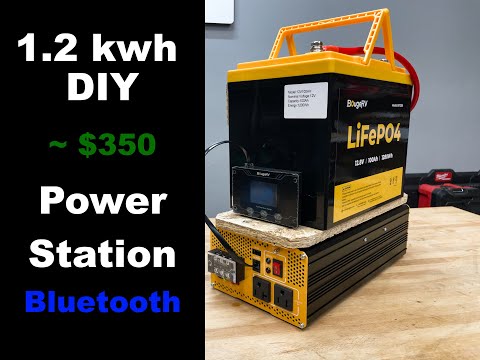
DIY Portable Low Frequency Transformer based Power Station | $530 | 1.9 KWh | victron Phoenix
📦 Products Featured in This Video
Victron Energy
Victron Phoenix Inverter 12/1200
$600
Buy on Signature Solar →
Affiliate link — we may earn a commission if you purchase through this link, at no extra cost to you.
Victron Energy
Victron BlueSolar MPPT 75/15 Charge Controller
Buy on Signature Solar →Affiliate link — we may earn a commission if you purchase through this link, at no extra cost to you.
Comparison that includes this video
🔗 Links Mentioned
Affiliate link — we may earn a commission if you purchase through this link, at no extra cost to you.
📝 Description
Affiliate link — we may earn a commission if you purchase through this link, at no extra cost to you.
Discount Coupon code ($50 off $500): GET50TGBATG
Links below to signature solar will give you $50 off any order of $500 or more.
Victron Phoenix: https://signaturesolar.com/victron-phoenix-inverter-12-1200-ve-direct-1200va-output-12vdc-input-120vac-output/?ref=bkpkbxde
Eco-worthy battery: https://amzn.to/4gMDULH
Charge controller: https://signaturesolar.com/victron-bluesolar-mppt-75-15-solar-charge-controller/?ref=bkpkbxde
Victron direct Smart Dongle: https://amzn.to/4iaFMyT
In this episode, we take a look at how to build a DIY portable power station using a 12V lithium iron phosphate battery and a Victron Phoenix 1200 VA low frequency transformer based inverter. This system can easily be put together in a matter of 10 minutes or less and cost less than $600. You can add all the Bluetooth capabilities and charge controllers for roughly the same cost. This system will be highly reliable mainly because it uses a low frequency transformer based system instead of almost all other power stations that are currently on the market, which are high frequency, based inverters. Due to the reliability, I have personally experienced with high frequency based inverters failing this is the optimal and more preferred system. Also because everyone knows the Victron Phoenix inverters and Victron equipment in general just seems to work all the time.
The entire system can be monitored using free apps that can run on your phone that connect devices via Bluetooth. You can monitor the specs of the battery and the inverter giving you full monitoring capability directly.
What I've noticed is many users. Don't actually need all of the capabilities and use power stations as points source use.
Low frequency vs high frequency inverters
batterysolarinvertervictronmpptcharge controllerpower station12vdiy
🎬 Related Videos

📝 Video Transcript
Yo, what's up guys? Welcome back to the channel. This episode, I'm going to talk to you about the most reliable, probably really efficient, and also the most cost-effective power station that you can build in probably less than 10 minutes, all right? That's going to be this one right here.
Probably my most favorite reliable power station, this one, all right? So, let me tell you a little story about why we built this thing. But before I tell you that, let's talk about high-frequency based power stations, right? So, almost all the power stations that are currently on the market are high-frequency inverters, pretty much.
They take DC power, convert it to AC using things like MOSFETs and H bridges and stuff like that. And I can get too far into it, but that is one way to convert DC power into AC power. There's another class, which is not as popular, uh types of inverters that are on the market, that are low-frequency transformer-based inverters. And those use, you know, like big old coils and stuff to get that DC power to AC power.
And because there's not a ton of MOSFETs and all that kind of stuff involved into it, it actually really, really reliable. And another thing that people know about that is that they can take a higher surge capacity for, you know, a pretty good amount of time. So, with that out the way, let me tell you the story about why we came up with this contraption, all right? So, if you've been following the channel, you know we own a lot of power stations, and you probably know we've had the warranty, I want to say like three or four power stations.
Two of them were dead on arrival. Two of them actually just stopped working, all right? So, we had to try to warranty them, right? So, that's kind of why we started thinking, "Hmm, something's not too reliable with these high-frequency based inverters, right?"
So, also with that being said, another story, uh continuing on that story, is that we went camping. We took three power stations. One of them was dead. It just didn't want to turn on.
I know it was charged cuz we unplugged it before we left and took it in there. And the screen came on and all that stuff. So, we knew it had battery, but it wouldn't convert to uh, AC power. So, started really thinking, "Hmm, we need to build something that's really more reliable than that."
And you would think that, you know, the bigger name brands have something of a more reliability into those types of products, and you would probably be right compared to, you know, the lesser known brands, but none of them, I believe, are low-frequency transformer-based inverters, which are probably the most reliable type of product currently on the market. So, we're going to show you how to build this for really cheap, really reliable, and really quickly. So, if you want to know more about this, stick with us. All right, we're going to go through this quick, see if you can keep up, right?
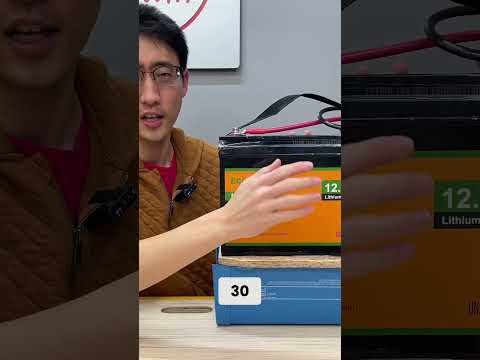
First of all, this right here is a 12-V 150-A hour lithium iron phosphate, uh, battery. All right? So, uh, you obviously don't have to use this exact battery. You can use any type of battery you like as long as it's a matches with the inverter that you want to use, and it's the capacity that you want to use.
So, the most common size of, uh, 12-V uh, lithium iron phosphate batteries is probably going to be 100-A hours. This is 150-A hours, and it's pretty much all plastic, kind of reduces the weight a little bit. Uh, but there are like 50-A hours, 60, 30, you know, get whatever amp hours you need or you want, but also keep in mind as the, uh, capacity of the battery changes, it also changes the discharge rate. So, just make sure you keep that in mind, mainly because you need to be able to discharge how much power you need to pull from the inverter, right?
Common sense. So, uh, this battery is particularly, uh, important, or I really use this battery mainly because the size of it, as you can see, matches almost perfectly or really well with the inverter, but also because this battery has Bluetooth. So, you're going to see on here there's no screens or any of this stuff, right? Because all the monitoring of this power station is done with the app.
There's an app for this battery. You can check the battery stats and all that stuff on Bluetooth. And there's also an app for the inverter. We're going to get to that, right?
So, this battery is attached to a piece of OSB, which is attached via construction adhesive uh to the battery. And we've let it cure for pretty much like several days, so I'm not worried about it. And we've been lifting it up and moving it around, so I'm not concerned, all right? And if you're going to say, "Oh, you're you're concerned."
Just get like a strap and just like strap it here and then make the concern go away. But, I would also glue it if you're going to do that anyway, just in case, just because it'll like wiggle, right? But, uh if you're going to do this, uh I would recommend using something like PL Premium uh like 8X or 3X or whatever, and just slather a lot on there and you'll be fine. I used a Liquid Nails Fuse-It mainly because I had a tube already open and didn't want to open another one, but had no issues with it.
This All this stuff has been tested for like multiple YouTube channels and stuff like that, so don't worry about it, all right? Um attached to the OSB is this a Victron 12-V 1200 VA pure sine wave inverter. It's attached using screw here, here, here, here. Four screws, all right?
Um the other thing to know about this is that this is a low-frequency inverter, so it is really heavy compared to like a a high-frequency uh inverter, kind of like the one you showed you in the previous episode where we're using like a Bouzer V12 uh volt high-frequency inverter. But, low-frequency one, because it is uh has a transformer in it, it's really heavy, all right? So, it's attached, like I said, to the OSB, which is attached to the battery, all right? So, pretty easy.
Next step, just get some uh cables. I believe this one may be either six-gauge or four-gauge cables, and I'm using Anderson uh quick connects here. So, these Anderson connectors, a lot of people are may you know have may disagree with this, but these Anderson connectors are actually rated to be disconnected under load, uh depending on which Anderson connector you get, I would recommend getting the genuine Anderson connectors, uh but they all have a rating. So, depending on how you build this, just just figure it out.
But, obviously, I would highly highly recommend do not disconnect under load cuz you'll probably have all kinds of other issues. So, I would say, you know, you can do that, but don't do it. All right? So, uh it's connected to this Anderson connector, and it connects to here.
The plus goes to the plus, minus goes to the minus. That's it. That's all you really need to do to get the system running because now you're powering the inverter using uh battery power. This thing right here is what you call a Victron Bluetooth uh smart dongle, and this actually connects to a port on here using VE.Direct, and it allows uh Bluetooth connectivity to monitor the inverter.
So, I'm not going to fully review this inverter and all this kind of stuff, mainly because you've already seen me build plenty of power stations with this exact inverter. Not exact, but the Phoenix inverter cuz we were using 48-V inverters at that time, right? So, that's all you really need to do to get it to work. This thing is literally just attached on here with hot glue.
I don't really have any issues with it, but, you know, I don't even know if I'm going to keep it there all the time, mainly because I'm not going to be sitting there on the phone monitoring the power station as it's in use. Maybe I'll check at the capacity of the battery just to see, you know, how much run time and stuff like that is left, but I generally have an idea how much uh power the inverter can put out. It's pretty simple. 1,200 VA.
If you don't know what VA is, volt-amperes. It's apparent power. If you want to convert it to real power, which is really measured in watts, uh most devices you're probably going to be using is going to be a point uh seven or point eight power factor. So, just take, you know, 1,200, times it by point seven, and that's probably how much continuous output that you can pull out of the inverter.
So, just make sure you keep that in mind, all right? Because the Victron rates their stuff in VA, and for some people, that's important, all right? So, that's all you really need to do to get this thing going. So, if for whatever reason, uh you know, I needed to disconnect it, which I probably don't, I can just pull the connections apart, or you know, you can just pull this apart.
But, because I don't want to ever have to unwind the screws on this thing, I just made the quick connect here because I can either connect alligator clips here to charge it, or just plug in the charger into here. It just makes life super easy, okay? Uh one thing I would recommend if you're going to build this is to get uh more flexible wire. So, even though this is pure uh copper, um it's not necessarily as flexible, and that may just be the jacketing type that may or may not be on there.
But, if you can get something like four gauge uh silicone wire, then that would be, you know, obviously, much better cuz it'll be a little more flexible, and you can kind of clean it up, all right? So, that's really the power station in a nutshell, and I know for a fact someone's going to say, "Oh, it's not a power station cuz you can't charge it, okay?" That's technically true. And I will also say most people who have a power station are probably going to use it as a point source of use.
They're not going to take it out and try to charge it ALL THE TIME. BUT, if you wanted to do that, and you wanted to charge it, just go ahead and spend like 50 bucks or whatnot, and get a I would recommend this one, the Victron Energy Smart Solar Charge Controller. So, this one has Bluetooth, which is why I'm recommending this one, and this one can handle up to 75 uh volts and 15 amps, okay? Uh so, all you really need to do if you wanted to use a charge controller like this is to put it here, right?
And then just take two wires, take it out of uh the where it says load, and take it to our battery, technically, and then take it to uh plus here, minus there. Bam. You can have MC4 pigtails coming out of PV. You can just connect your uh solar panels, and you'll be good to go.
This one is a smart solar has advanced capability that you can connect to like load and disconnect and and other stuff depending on how much power you have, right? So, I have this one, but you really it's like four wires you just need to add two here, two here for solar. You're going to be good to go. But, like I said, I probably not going to really use this because the way I'm going to use this is a point of source and I'm not going to go ahead and try to charge a bunch of stuff, right?
But, if I was going to go camping like that, I would just take this with me with some solar panels and be good to go. All right. So, power station what not there's a definition. So, let's go ahead and show you this stuff in action, all right?
So, we're going to go ahead and take this heat gun and we're going to plug it in right here, okay? I'm going to flip the switch, which is right here. So, switch, flip, done, bam. It will power up and you can see eventually this one will have a light and ability to turn on, but I do also want to point out one thing on here.
This right here has a little function called eco. So, you can flip it to the eco mode and you can just leave it on the whole time. Wouldn't recommend doing that, but what it will do is it'll just keep searching to see if there's a load on the AC output here. And if there is a load, it will turn on.
And that load threshold I think can or cannot be adjusted inside the app. So, that's a nice feature to have. So, if you can you don't want to put it in a place you have to reach all the way back around and flip a switch something like that, that may be for you, all right? So, I'm not going to use eco, so I'm just going to hit it on on and there you go.
Green light means on. I'm going to go ahead and plug this in here or I mean hit the button. There you go. It's going to be loud, so I'm going to turn the fan to low, but then turn the heat up.
All right, so the heat is up. Look at that. Heat up and this is the power station in action. So, take a listen.
You don't really hear much from the power station. The noise you're really hearing is from the heat gun and not necessarily the power station because there's not a ton of air movement that needs to cool the H bridges and the MOSFETs that it's a really, really quiet power station, all right? You may hear like a low-frequency hum or a buzz that you would get from a transformer and that's what you're going to be getting, but you know, that's really it in a nutshell. So, let's go ahead and look at the app so I can show you exactly what's happening.
So, let's go take a look at the app. The first app we're going to look at is the battery app and it's called the EcoWorth the app. This is obviously an EcoWorth the battery. You can download it for free from the App Store or Play Store, connect it via Bluetooth and this is what you get, all right?
So, right now the battery capacity is at 99%. It's roughly around hovering around 13.19, 13.2 volts and it's drawing right around between like six or seven amps or five or six amps, right? Uh the power that is being drawn from this is hovering around 70, 80, somewhere around there. It's discharging.
Remaining capacity is 148 amp hours and depending on, you know, the watts being drawn tells you the amount of work time left or run time left at the rated at the amount that is currently at discharge, right? So, at this rate of discharge it'll be roughly around a day, right? You can look at the current battery temperature, you can go in here and look at the data, you can go in here and look at the voltage, the state of charge, all of this other stuff. For some reason this thing here says battery total quantity four.
I'm not really exactly sure what that means, but it's got four uh batteries and you can see the voltage of each cell. So, that's also really nice. You can go to notification if you get like a warning or something like that or for like cutouts or you can go in here and take a look at it. So, like I said, we're not going to go super deep into this battery, but you can monitor everything about this battery using the app.
Now, let's go take a look at the Victron app. So, the Victron Connect is the app that you need to get. It's different than the VRM app. Uh and once you get it, you just pair it to your Bluetooth dongle and this is the VE Direct Smart Bluetooth app.
As you can see right here, AC output about 120 volts. It's in the state of inverting. You can go ahead and see the VA is hovering around, you know, 50, 100, somewhere around there. And that's all you really need.
That's all you really, you know, really get and that's all you need. I mean, what else do you really need? Uh you can also tell in here you can look at where it says wake up power as I was telling you about earlier. If you wanted to somehow update the amount of uh when you want the inverter to wake up on eco mode, you can change that here, right?
Or you can change change the uh shutdown power. So, it's nice to have in case you want to leave it in somewhere remote and only come on when you like turned on something, right? Uh but we're not going to get too far into that mainly because this is not a review of each of these products. It's really a power station that you can build, right?
So, let me go ahead over here and just turn on the uh heat to a little bit more heat so you can see how much is actually being drawn. So, there we go. Look at that. Right now, it's at about five bars of heat and it's drawing about uh 1,000 VA, right?
If I hit it at all six bars, now we're drawing close to 1,200 or 1,300 VA. And let's go take a look at the EcoFlow battery app with the refresh here. And you can see now it is discharging close to 94,92,95 amps, all right? So, as you can see here, at the full heat uh of this heat gun, it can run maybe about an hour and 30 minutes, all right?
So, like I said, everything is available in the app. And that's what you get with this power station. Let's go ahead and turn this off mainly because uh it's just going to be really noisy. And this usually, if you don't know what a heat gun does, it just has like a cool down cycle, so it doesn't just like automatically or abruptly adjust.
But for the sake of this video, I'm just going to unplug it, all right? Don't do that, all right? So, otherwise, you know, that's what you get with this power station. It's really easy to build, as I mentioned earlier.
You got four screws, some construction adhesive, you got this battery, OSB inverter, maybe some cables, really easy to build. And you're not going to have a reliability issue because this is lithium iron phosphate battery, and this is a low frequency based inverter, all right? And not only just any low frequency based inverter, it's a Victron, all right? So, if you want to buy this inverter, I would highly just check out Signature Solar, because, you know, they sell a lot of Victron stuff, and I really like Victron stuff.
And, you know, you can really get some good deals on there sometimes. So, you can get this battery. I believe I bought this battery on the eBay using like some 20% off coupon. Every now and then they'll have some type of sale.
Eco-Worthy is, uh, you know, probably the most eBay sold battery, if I had to guess. But anyways, let's talk about cost now, right? So, this battery, if I remember correctly, was somewhere around like $220. Uh, this inverter was somewhere around, I want to say, about $300.
So, you got $220 plus $300, that's like What is that? Like $520? And then, if you want to get the Bluetooth for the inverter, which is this guy right here, I think that's around like 20 or 30 or 40 bucks, right? But not more than 40 bucks.
Maybe like $39.99 or something like that. If you need some cables, you could always pick up those cables from Signature Solar or anything like that, but that's all there really is to it, right? It's There's really nothing on here to break. Obviously, if you dropped it off the table, you know, something might get damaged, maybe some plastic will crack, but my guess is that once you get it back together, it'll probably still work.
Don't drop it off the table, though, okay? The point is, when you use it, it's easy to transport because you got this handle to pick it up. The only other thing I'd recommend is just get like some piece of foam or something like this. I would just cut out like a good piece and just like attach it to the bottom of this inverter just so that when you put it down it's got some cushioning.
All right, so when I'm using it I'm always just putting it down on something like this so that way I don't have to like deal with it. But even if you're a little bit rough, just get something like that, put it down here. I will also caution you this is going to be way heavier than you know your standard like power station that you get off the market mainly because this is a bigger battery and this is a low frequency inverter, right? So this right here is a 12.8 volt battery times that by you know 150 amp hours, you're going to be getting somewhere close to about like 2 kilowatt hours of capacity here on this battery alone.
Then you got to add the weight of a low frequency inverter here, then you know it's just going to be adding up in weight. But what you give up in like weight or less weight, you gain in reliability. Actually, I would argue you gain even more in reliability cuz like I said there's really nothing to break, right? So with that being said this is the power station I'm going to recommend you build or anybody build mainly for if you have any type of reliability concerns, just do it.
You know, that's all I can say. So hopefully this video helped you guys out. I'll stop rambling. Have a great day, get back to work and we'll see you guys next time.