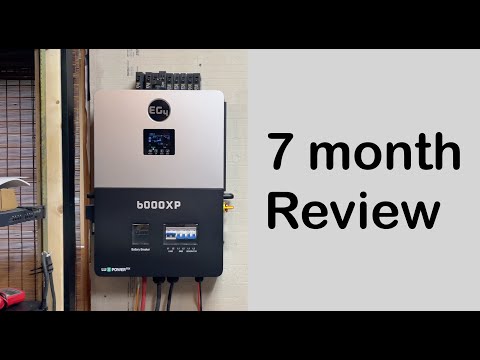
EG4 6000XP WIFI issues | How to fix it
📦 Products Featured in This Video
EG4 Electronics
EG4 6000XP Off-Grid Inverter
Buy on Signature Solar →Affiliate link — we may earn a commission if you purchase through this link, at no extra cost to you.
Troubleshooting note from this video
🔗 Links Mentioned
Affiliate link — we may earn a commission if you purchase through this link, at no extra cost to you.
📝 Description
Affiliate link — we may earn a commission if you purchase through this link, at no extra cost to you.
Discount Coupon code ($50 off $500): GET50TGBATG
6000XP Inverter: https://signaturesolar.com/eg4-6000xp-off-grid-inverter-split-phase/?ref=bkpkbxde
🛠️ Troubleshooting note on this topic (our experience, not instructions): https://tgbatg.org/articles/eg4-6000xp-wifi-dongle-wont-connect.html
In this episode, we take a look at the Wi-Fi issues with this all in one EG4 hybrid inverter. We'll go over the troubles and struggles that we went through to get the Wi-Fi to work connected and working through the app.
Features:
The EG4 6000XP is a cutting-edge 48V split-phase, off-grid inverter and charger, designed to revolutionize your energy needs. With an impressive 8kW of PV input capacity and an efficient 6kW continuous power output, it also serves as a battery 140A charger. What sets it apart is its scalability - you can parallel up to 16 units for an impressive 96kWs of output power while controlling multiple stations and units seamlessly using our advanced EG4 monitoring software.
Performance Components
6000W rated output power
Parallel up to 16 units for 96kWs of output power
Built-in Switchgear for reduced installation costs and enhanced safety
Save up to $300 with built-in breakers, disconnects and more!
Transformer-Free Design
Dedicated Generator Connection
Inverter, AC Charger, and Solar Charge Controller
All-In-One
Everything needed to get started
Simple to install, easy to manage
Manages power from energy storage systems, and grid simultaneously
120/240V split phase
Efficiency
MPPT Efficiency 99%
Outperforms similar-sized competitors by an average of 7%
Battery Charging Efficiency 93%
Battery Discharging Efficiency 93%
50W Idle Consumption (with battery)
Monitoring
EG4 Monitoring App
Wi-Fi/4G/LAN
RS485
Comprehensive Certifications
UL 1741
Ingress Protection Rating: IP20
#eg4 #energystorage #offgrid
batterysolarinverteroff-grideg4mpptcharge controller48v
🎬 Related Videos
📝 Video Transcript
hey what's guys back to the channel on T episode I want to talk to you about getting your Wi-Fi dongle to work for your eg4 6000 XP okay so uh long story short we bought this unit uh as soon as it came out no we didn't get special orders or any of that stuff uh or pre-release or any it just came out on the uh website we ordered it a few weeks later it arrived and we installed it bam right off the back everything worked no issues well I mean getting the inverter part the functional that part all worked right the part that we really had issues with was the Wi-Fi dongle so we went through an entire ordeal of days of issues and troubleshooting craziness of stuff to get that to work and we learned a lot from trying to get that to work so if you're having issues getting your Wi-Fi dongle to connect or you have questions about trying to get it to connect this video is going to be for you okay so uh if you want to know about that or if you want to try to figure out details and make this easy for you stick with us all right you guys so this right here is eg4 6000 XP okay and before uh anybody goes out and points it out I'm going to go ahead and say yes this is not in the best location right now and uh yes we know that but unfortunately it was the best location we could technically put it in at the time okay yes I know someone's going to point out there's a lot of space right here okay uh that technically is true but when we got this we were actually using eg4 6500 EXs and there was one right here amongst a bunch of other stuff that we've had so you know it has to be right here okay uh but the reason I'm pointing that out is because everybody who has this understands the Wi-Fi dongle is actually located right here so you see this green light little thing right here it's coming out right here that's where the Wi-Fi dongle is and if you know anything about signal propagation and stuff like that it's not good to be you know pretty much this metal box here and then they got this this metal box of entire batteries and stuff here so the signal propagation is not the greatest but it does work okay so uh I do want to point that out before we get into it all right all right so now let's get into it um so the Wi-Fi dongle uh that you get with the unit it does come with the unit connects to a port right here that kind of looks like an HDMI port you can permanently secure it in using screws that are included I didn't do that and it works fine and that's not the issues that we had okay so let's talk about the issues that we ran into first of all when you get the Wi-Fi Dongo and you try to set it up it tells you in the instructions literally to contact your distributor or the place of purchase or whatever the place is called to get a code when you are registering the device okay um and that's a problem that's problem number one for me mainly because it doesn't matter who the distributor or seller is I don't really care I just want to be able to get it done by myself without having to be on the phone send an email to go figure it out okay that is an issue um mainly because you know like I said you want to be able to empower the people to do it themselves in that case that was a problem mainly because it stopped me from getting it to do myself pretty quickly all right and if you look around on the forums and on online videos and stuff for whatever reason um people if they somehow they're not allowed to post the code on a forum post or something like that so I'm going to go ahead and tell you my code was signature okay all caps signature because I bought it from signature solar actually it's been a few uh weeks actually months since I had this thing working so that may not be correct but if it's not I'll point it out in the video after post effects or something like that but the point is my code was signature okay and I did not find it on the forums um I did not find it in a book I did not find it in a video I just had to contact somebody to get it and that's a problem okay so uh that's problem number one to add on to that problem people were saying make sure you get the code right make sure you copy and paste it perfectly blah blah blah mainly because they say it has uh if it has spaces like you get it from places like signature space solar right you can't you don't want to put that in all kinds of stuff you don't want to put lowercase all that is just crap okay if you're coded signature just put signature in um I know a lot of for posts and stuff like that say that the Caps matter but I'll tell you right now it really does not okay so just put the word signature in um if you want to be absolutely sure put it in all caps Okay the reason I know this you'll find out later in the end so uh two problems with the code okay um I will go ahead and tell you when I was putting it in I didn't know what the code was I I emailed signature solar they didn't um contact me I was like more than three business days went by and they didn't contact me so I just guessed and put signature in um with you know all lower case and then that's where all those issues began and I learned all that crap right so anyways point in that some were through troubleshooting I said you know what forget this let's just go ahead and delete the account and start all over again so with my Infinite Wisdom I I decided to delete my account a little do you know when you delete the account it only really deletes the account uh from like some front-end component right the real issue is that the account itself does not really permanently get deleted on backend servers or wherever this entire system is running okay the reason I know that is because when I tried to recreate the account it says account already exists okay um so you can contact you know support and try to figure figure out all this kind of fun stuff but at the end of the day even if you get the account part already exists um when you register the uh Wi-Fi dongle you also have to put in the serial number and like the code for the Wi-Fi dongle so even though the account itself eventually gets recovered through support that Wi-Fi dongle part that's being registered is still already registered somewhere else even though your account has already been deleted after contacting support okay so like I said two uh there actually mult multiple issues in every issue right so uh there's like two issues there okay so don't delete your account if you're having issues with it just contact support as painful as it may be whoever vendor or support you're getting from if whatever it's good whatever it's bad as painful as it be you're just going to have to suck it up and just get through it okay U because there's no way to permanently delete your stuff uh on your own control if that even makes sense all right so uh those are two issues going on to issue number three so for whatever reason and most people know there's a lot of iot devices like this will only connect to a 2.4 GHz Network okay that's not a problem because a lot of people who have a lot of that stuff will create specific networks uh for 2.4 gahz Network um but for whatever reason mine was not connecting to my specific 2.4 GHz Network and I have a network set up for iot devices and it only broadcasts on 2.4 GHz Network it doesn't use the 5 GHz band but for whatever reason mine doesn't connect to that uh so we tried all kinds of stuff just being uh working with people people to get it to work uh we even combined or smash both radios together to broadcast on one SSID just imagine going through your router and configuring all that stuff that was a pain okay so regardless um I'm going to go ahead and tell you right now it doesn't matter it can only connect to 2.4 GHz Network and you're having issues connecting with it go find yourself another router or change your network SSID uh change your password all kinds of stuff to get it to work okay because in my particular case I don't know if this was the only issue but one of the issues was that the SSID had a uh special character in it so we think that's one of the reasons why it wasn't connecting so if it has some special characters in it yeah you're going to be uh I don't know up the creek so make sure it's pretty simple to use easy to learn all that kind of fun stuff the second thing is for whatever reason um if your password is really long and my my password is extremely long and has a ton of special characters in it too because it's like an entire sentence um it won't connect okay so I just made a uh at the end of the day all kind of troubleshooting aside got a secondary router got it directly connected there made it something simple like vanilla ice cream or something like that right connect bam done that was like almost an entire day went by fiddling with that thing so I'm going to go ahead and tell you take away from all the Jibber jabbering I just did 2.4 GHz Network make it banned only make it something super simple SSID super simple password bam connected done all right that's how you get that through it all right so um the other the was that like three let's talk about the fourth thing so the fourth thing I have issues with on this is if you look at the little dongle there's like three little icons or two little icons on there one says like has like a cloud button or Cloud LED one has like a Wi-Fi LED and other one will start blinking and stuff like that um from my experience working with support one of the things that told me was that that thing is not entirely correct so I kept telling them well it's connected to the network cuz you know the green light on the Wi-Fi icon is solid they're like well we're not really seeing it right so technically I guess speaking it could be connected but it's not talking to them and that's where the little Cloud icon is right so if you look at the thing I'll throw up a picture uh there's a cloud icon that either blinks or stays solid and if it's allegedly solid it should be connected to whatever servers and the cloud that it connects to to talk to so that part is also solid but what uh people I talking to or multiple people talking to are saying they're not seeing it on their system okay and that's a problem mainly because for me it was saying the device was successfully registered and when I deleted the account and tried to recreate the account I couldn't do that right cuz the device itself was registered already um and the cloud icon was you know blinking or solid anyways the point of that is don't believe all the icons on there I would say uh mainly because um trying to troubleshoot that way it didn't actually work out perfectly and this is like take this with a great ass but uh there is that so one how uh one reason or one uh way I was able to work through that was by the uh um goodness or by the graciousness of God right um I was complaining about a bunch of stuff on some of the forums and somebody contacted me um from uh the forums and I was able to dm with them and text with them directly um and I I will say I don't know this person uh personally or anything like that uh it was just by pure luck or the or the goodness of God the person reached out and that person happened to be you know a pretty involved engineer at I think it was either signature so or EG for that was able to literally walk with me talk with me and talk about the issues I'm going on with this okay so for me I have a network engineering background so I can either easily configure a bunch of stuff and I was able to get through that so uh that's why we were able to get through a lot of the issues we went through with that stuff right so um got pure luck I was on the phone with them and that kind of stuff and you know one thing they literally told me was caps do not matter in this case they know the code they designed the entire system and all that stuff caps on the code that you put in for registering do not matter um and then uh I was able to put that in like I said worked just fine um the SSID I think I told you about the thing you want to take away is make it straight up clean and make it 2.4 only don't put special characters and stuff like that the password's got to be simple okay and don't make it long either like I said mine was like an entire sentence so don't do that either and don't make it hidden all right so I do want to uh point out you know after all those issues and like days of struggles as I would to get it to work and it when it works it's fine okay I haven't had issues after getting it to work it's solid problem is getting it to work so I hopefully uh you know those things I talked about really helped somebody out uh I really wanted to put it out there so hopefully you know people are having issues with it arguing over code or how to you know get stuff going don't make the mistakes that I did and hopefully that helps us out so I do want to give a special shout out to some someone named Marcus who was the one who was able to help me uh to make it work um I don't have any special relationships with that it's just that that person's just a good person on the forums just trying to help people out um and just contacted me after you know all my complaining so hopefully this video helped you guys out if you have any questions let us know otherwise have a great day and I we see you guys next time oh