Victron MultiPlus-II 12V 3000VA Explained — 2x120V Shore Power, PowerAssist & Wiring Tips
Comparison that includes this video
🔗 Links Mentioned
Affiliate link — we may earn a commission if you purchase through this link, at no extra cost to you.
📝 Description
Affiliate link — we may earn a commission if you purchase through this link, at no extra cost to you.
In this video, we take a close look at the Victron Energy MultiPlus-II 12/3000/120-50 2x120V inverter charger, a 12V pure sine wave inverter charger designed for RVs, boats, trucks, mobile power systems, off-grid backup, shore power, and generator-based power systems.
Inverter: https://signaturesolar.com/victron-multiplus-ii-12-3000-12v-input-3000w-output-120-240v-120a-charger-transfer-switch?ref=bkpkbxde
Cables: https://www.batterycablesusa.com/anderson-sb-battery-cables
VIctron Smart Dongle: https://amzn.to/3RETr9C
10 AWG Ferrule for victron: https://amzn.to/4wSnjj3
This model is especially interesting because it supports 2x120V split-phase pass-through, which means it can accept North American 120/240V shore power or generator input and pass both legs through when connected to grid or shore power. But when it switches to battery/inverter mode, the inverter output is 120V single phase, not 240V. That makes this inverter charger especially useful for RV and mobile systems that need to use both sides of a panel on 120V, while still understanding that true 240V loads only work when shore power or generator input is available.
Why 12V inverters require high amperage
12V vs 24V vs 48V inverter system considerations
Victron MultiPlus-II 12V 3000VA overview
2x120V split-phase pass-through explained
Why 240V loads only work on shore/generator pass-through
AC input, AC output 1, and AC output 2 wiring
Spring-loaded AC terminals and proper ferrule length
Why undersized or short ferrules can create heat problems
Battery terminal studs and Anderson SB175 quick disconnects
VE.Bus, Victron Smart Dongle, and VictronConnect app monitoring
Pass-through power test
UPS-style transfer test
Battery charging behavior
Input current limit settings
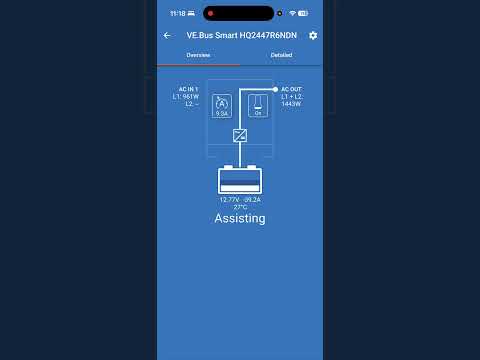
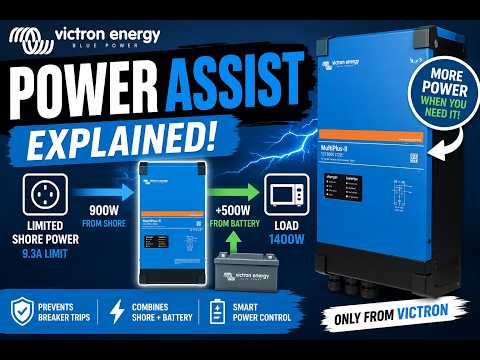
PowerAssist explained
Why Victron systems are modular
Why low-frequency transformer-based inverters are reliable
Comparing Victron modular systems to all-in-one inverters
The Victron MultiPlus-II 2x120V is officially described as a one-box mobile solution for standard North American 50A 120/240VAC split-phase applications. It can accept and pass through both lines of a 120/240V supply when connected to shore power or a generator, while switching to inverter operation when no AC source is available. Victron also lists features like PowerControl, PowerAssist, input current limit, two AC outputs, VE.Bus communication, parallel/three-phase configuration support, and compatibility with LiFePO4 and other battery types.
This unit will be used as a serious backup / UPS-style power solution, but it also makes a lot of sense for RVs, vans, trucks, trailers, boats, camping rigs, work vehicles, and other mobile power builds where reliability matters.
#victron #multiplus #inverter #rvpower #offgrid #offgridsolar #victronenergy #mobilepower #solarbattery
00:00 Victron MultiPlus-II 12V Inverter Charger Intro
00:23 Why 12V Inverters Pull So Much Current
01:33 Why 24V Can Be Better for Mobile Power
02:03 MultiPlus-II 3000VA Backup Power Use Case
02:40 Front Panel, Model Rating and Indicator Lights
02:53 2x120V AC Transfer Switch Explained
03:49 AC Output 1 vs AC Output 2
04:08 120/240V Split-Phase Pass-Through Explained
04:33 Battery Mode: 120V Single-Phase Only
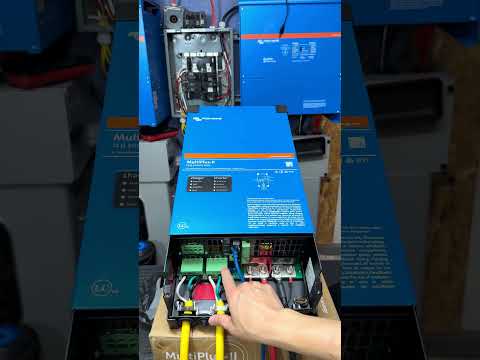
04:49 Opening the MultiPlus-II Wiring Compartment
05:35 12V Battery Input Studs and Anderson SB175 Cable
06:05 Victron Smart Dongle and Bluetooth Connectivity
06:22 Wall Mount Cleat and Grounding Lug
06:47 Auxiliary Terminals, Remote Switch and Sensors
07:28 AC Input, AC Output 1 and AC Output 2 Terminals
08:07 Spring-Loaded AC Terminals Warning
08:40 Why Proper Ferrules Matter
09:29 Heat and Melting Risk from Short Ferrules
10:08 Ferrule Length and Wiring Tips
11:58 50A Shore Power and Split-Phase Input
13:02 What Happens When Shore Power Disconnects
16:27 Anderson SB175 Quick Disconnect Test Setup
17:02 Why Genuine Anderson Connectors Matter
18:12 10-Gauge Extension Cord Test Wiring
18:51 Powering On the Inverter
19:23 Basic Load Test with Fan
20:29 Shore Power Plug-In and Transfer Test
20:44 Charging and Pass-Through Mode
21:17 Unplug Test: UPS-Style Transfer
21:31 VictronConnect App Overview
22:00 Charging Current and AC Output Data
23:21 Input Current Limit Settings
24:50 Why the Victron Smart Dongle Is Useful
25:20 PowerAssist Explained
26:33 Victron Build Quality and Reliability
26:58 Low-Frequency Transformer Inverter Design
30:23 Price, Value and Final Thoughts
powervictroninverterinputshorewhymultiplusoutputpassphasethroughbatterytestexplainedwhen
🎬 Related Videos
📝 Video Transcript
This right here is a Victron Energy pure energy MultiPlus 2 12-V inverter. And usually I am not a big fan of low-voltage inverters, but on this episode we're going to talk about this MultiPlus 2 inverter charger. And this is a little bit of an exception primarily because it's got a lot of things that it can do and its reliability obviously. But let's talk about the low-voltage part of it first, right?
So in North America, at least here in North America, the mains nominal voltage let's just say it's about 120 V, right? And this is 12 V in meaning it put it pulls in 12 V primarily because it's designed for mobile power systems, right? Boats, trucks, RVs, that kind of stuff. And cars like that are usually having a 12-V system, right?
So this can is designed to be used in those situations, but the point of this is that 12 V in and you want to get 120 V out, so the ratio is going to be about 1 to 10, right? So primarily closer realistically to 1 to 11 primarily because you know efficiency and everything all that stuff comes into play. But if you wanted to get 120 V out and 1 amp of that, right? You would need to pass in about 10 or 11 amps of 12-V energy into this inverter to get that same amount out.
And that's not a fault of this inverter, that's just you know energy and that's how it works, right? So I do want to point that out. So 12-V systems you kind of have to pull, you know, about 10 times roughly to get to the same amount of, you know, output. And 24 V that really cuts down.
So if you're going to have a build a mobile power system and if you have an option to go with 24 V, right? Instead of the 12-V primarily because your vehicle or like your RV power system uses 24 V, then that would be an ideal situation to go 24 V because you're cutting the amperage you're going to need to pass into this thing in half. And that is, you know, huge primarily because cables need to get big, you need to run a lot of cables, they get expensive, all kinds of stuff happens. But, you know, we're not going to dive too deep into that.
But, on this episode, we're going to talk about this MultiPlus II, a 3000 VA inverter, and I plan to use this in a permanent backup solution. Uh as you know, we really big on Victron inverters primarily because of their reliability, like these two guys here. These things are massive. But, uh the quality and the reliability and all of that stuff comes into play on this MultiPlus II, also.
So, without too much further ado, let's get into it. >> [music] >> So, this right here is obviously the front part of the inverter. As you can see here, it says MultiPlus II, 12 V 3000 VA 120 A. So, that's a lot of uh capacity it has right there.
And this one in particular has an AC transfer switch as all MultiPlus do, but this one has two of them, 2 * 120. And that's where this thing has a lot of tricks and special abilities up its sleeve. It has an AC transfer capacity of 50 A, meaning the tran- the AC uh transfer switches that are built into here. And obviously, the output of this is 120 V.
Uh they do make models of this that are like 230 and stuff like that. So, if you're interested in that, you know, or if you need the 230 ones, make sure you buy the right ones. But, this one has a lot of tricks up its sleeve because of the 2 * 120, okay? Um and as most Victron inverters go, this is an inverter charger.
So, when you're in charging, you know, all of these lights will come up. And when you're inverting, all of these lights come up. But, as you can see, as the picture that's drawn here, if we can get this thing to focus, you see AC in, there's a line one, line two, they're both connected here. You see that switch, and it goes out here, and it goes out to AC out and AC out two.
Uh so, on these types of MultiPlus two inverters, the AC output one is the one that stays on, right? When you go to battery backup, but in the AC output two is the one that is not on battery backup, as you can see right there. So, this one, as we said earlier, can pass in 240 volts split phase, so you got two hot legs. So, when you're using an inverter or something like this and you have a 240 volt output or you need a 240 volt input for like some of the devices like, you know, an AC or an oven or something like that, you could you could you power that device from this inverter using pass-through power only, right?
But, if you disconnect from that pass-through power, you will not be able to power that 240 volt split phase device and you'll only be able to power 120 volts single phase device. I know that's going to be confusing, but hopefully we can dive a little bit more into that when we open this up. So, in order to open this up, there's two Phillips screws here. There's one here and one here.
It's a little bit different than the 48 volt ones or maybe the I have the older 48 volt ones there that have two Phillips screws right here. They've kind of angled this here and then it kind of makes it pretty simple. But, on this one the switch is here and if you put it to mode one, which means it's on, it can do charging and inverting, but if you put it to mode two, as you see right here, it goes to charging only. So, if you wanted to use to charge your batteries only, you flip it to mode two and that charging switch is right down here.
Now, you can barely see it, right? So, let's open this up and I do want to point out this is not connected, so you know, before you go ahead and say, "Oh, they now that's dangerous. Don't touch that. " Yes, definitely do not touch that, but in this case it really is disconnected and it's been at least like 15 minutes or so since it's been disconnected, but we'll go ahead and use an insulated screwdriver just in case, you never know, right?
So, >> [clears throat] >> as you mentioned earlier, let's talk about this. This is the 12 volts input. You got two studs right there and you got the minus 12 volt input for the two studs right there. Uh one of mine right now is connected to this uh Anderson SB175.
Uh this right now, yes, it is undersized for this primarily because this is four gauge wire. I do have two gauge wire laying around, but you know, I don't plan to run this at full capacity right now for extended periods of time, so that's going to be fine. But two studs, uh these two wires right here are connected to this Victron's uh smart bus dongle. We can talk about that later, but that's essentially what gives you the Bluetooth connectivity cuz Bluetooth connectivity is not built into this device by itself, okay?
Uh but two of them right there. It's got a grounding lug right here. Uh and then when you mount this on a wall, it's kind of got a cleat system. Uh you mount the bracket on the wall, and then you set this down in its cleat, and then you would put a mounting screw right here, which you obviously can't see, but it mounts it stops it and another one right here so that when you bump into it, it doesn't just fall off, right?
Uh there's that. Let me get rid of this so we can see a little bit more into this system. Uh so battery terminals here, uh you got a bunch of auxiliary connectors you can put here. Uh you got like sensing terminals in case you have like water uh or or sensing terminals and then uh aux terminals.
So if you had like CT sensors and stuff like that, you could put that here. Auxiliary ports, if you wanted to put like a water tank level and stuff like that, you put that here. Ground relay, all that stuff is here. Uh there's other advanced controls like if you were to use a remote switch, uh that stuff is here.
And current sensing would actually plug into here, but uh other sensors like I talked about earlier, uh especially if you're on like a boat system, those plugs go right there. So I know that's going to get complicated. We're not going to dig too much into that, but if you're on like a mobile boat system and stuff like that, you would use a lot more of these, right? But in most uh off-grid use cases, most people aren't using that.
So uh going up in here, here's the AC in, and here's the AC one out. Here's the AC two out. And if you look at it, you see right here, it's got line one, uh protective earth, line two, and then neutral. And as you see right here, in this one I have wired up, I wired up with 10 gauge wire, and I've only wired up one hot, one ground, and one neutral.
And on the AC out, I've only wired up one leg of hot and in earth. Um I do not have line two wired up and a neutral right here. And you'll see why I have it up in this case in a little bit. But the important thing to note about these terminal and I guarantee you most of the people or a lot of people are probably not doing this very well or wiring this up improperly, is going to be caution.
Um you have to put the uh insert wire about at least 0. 7 of an inch into the spring-loaded terminals here. Spring-loaded terminals, not a lot of people are, you know, huge fans of that. Uh I do wish they had a different clamping system.
I do think that that would make it better. Uh but on this system, it's a spring-loaded clamping system, and it gets to be a pain. And when you're going to do that, you need to wire up ferrules into the uh wire that you're using, unless you're using solid wire, so that you can get, you know, a good connection. Let me see if I can pull one of those out.
In order to pull one of those out, you would stick a sharp, you know, you know, pointy uh strong object into this hole here, right? Which reduces or gets the load off of that clamp, and then you can pull this out, right? So, let's go ahead here, pull this out, see if I can get that thing to focus here. If you can see right there, focus on that.
As you see right here, this is not your typical uh ferrule length, cuz this one I bought specifically to fit into here. And like I mentioned earlier, uh a lot of the ferrules are usually not this long. They're probably come out to about here, right? And when you put a shorter ferrule into here, it doesn't make a strong connection.
And then because it does not make a strong connection because of the length of the connector going in there, Um when it when you're under load, it gets really hot and but there's a potential melting hazard here. So, uh in the instruction manual, you should definitely read that. It says, "Make sure you get a long ferrule about this length and put it in there. " And just in case you did not see that when you're wiring it up, you're definitely going to see that because Victron has put a warning sticker right up in there so that you get the right length ferrule or the right amount of wire essentially connected to this terminal.
And that is a big uh thing to keep keep track of. So, if I were you and you're wiring this up, make sure you order the right ferrule lengths. Um if you're using 10-gauge ferrule or something like that, I'll see if I can find uh the ones that I have and drop link in the description below. That case, I know for for me when I was looking for these ferrules, it was really hard to find like the right length ferrule for 10-gauge wire for this purpose.
So, um that's definitely something I'll keep in mind. So, uh as you saw right there, um you can push the wires into these spring-loaded terminals without having without relieving the pressure from here, especially if you're using solid or like ferrule uh capped wires. Uh so, you can put that in, but it's definitely easier if you have a metal object like this. You just put it in that hole, relieve the pressure off there, and then you can put the wire in.
And obviously, do the tug test. But what I would also like to do is come back here and do the push-in test to make sure that it's fully seated as far as it'll go into that clamp, okay? Very important. And that's true for all of these.
All these green big ones here, like here, here, and here, it's true for all of those, okay? And like I said, if you want to pull the wire out, get something like this, put it in there. I've seen people use like an like an actual framing nail and do that, but I would get something like this cuz it makes it easier to do that. If you need a link to something like this, I'll try to find it and drop a link in the description below.
Uh that way that way it can get you going, okay? So, in this uh system that I'm using it for, it does not I am not using it uh AC to out. A lot of people, especially in RV systems, probably won't be using that or maybe they will, who knows. But, most of the people I know are not using that.
Uh but, as I mentioned here, if you pass if you're passing 240 volts in, you have two hot legs cuz they're 180° out of phase. That's why you get that split phase and you get 240 across the two hots. Uh in my case, I'm only using three. So, uh let's talk a little bit about the use case of of the pass in, okay?
So, if like I talking about on the RV systems or mobile power systems, um a lot of times when you go to a campsite or something like that, they have a receptacle box and sometimes they may be 30 amp, sometimes they may be 50 amp, and sometimes most of the time, at least around my area, they're split phase. So, if you plug in a 50 amp split phase system into a connector from your RV or vehicle into that plug, you're going to be feeding in 240 volts split phase. So, those would go into here, right? And then you would be able to pass through that uh uh power essentially out of AC out one and two.
Therefore, you get the full capacity of that connection essentially, right? Because if you look at the AC transfer capacity of this, it's got 50 amps. The 50 amps on a 50 amp receptacle, you're getting full power, right? So, uh you're able to essentially get everything inside your RV or mobile system fully powered up, okay?
Um only when you disconnect from that, then it goes to uh AC 1 out only, right? And you will only be getting single phase AC output one. Mainly because this inverter, as you see we talked about earlier, is 120 volts uh single phase. The reason they have two hot legs on here so that when when plug into that 50 amp, you know, connection, it passes through all of that power and you can get it here and here as well, okay?
So, just make sure you understand that when you're buying something like this because you're only going to be getting 240-V split phase when you're plugged into grid power, mains power, whatever you want to call it. But, when you're on battery power, you will only be getting single-phase 120-V out of AC output one. All right? Hopefully, that's clear.
I put that as clear as I can make it, but that's a really neat trick that it has. And so far, at least all the inverters or all the retailers I've seen around me, and we picked this up at Signature Solar. So, if you want to pick this up, we'll drop a link in that description below, as well. Um the the this 2 * 120 seems only be true, I think, in the 12-V systems, which I think makes sense primarily because the 12-V ones are the ones that are being used in cars and RVs and stuff like that.
People go camping, you know, all those connections, that's where that would really come into play. So, the other thing to note is that when you have uh plugged into uh what do you call it? Uh mains power, from what I can tell in the testing that I've done is that the charging of the battery only happens from one leg, okay? Uh the charging of the battery does not happen uh at least from from my experience, and I could be wrong, and somebody may need to correct me here, but it only charges from one leg, L1, okay?
So, um you're going to be, you know, still charging the battery, but it won't be charging at the full 50 amps passed in through here. So, uh maybe I need a firmware update or something like that, I don't know, uh but that's what my experience, right? So, even if you plug into the 50-amp receptacle, you can still pass through as much of the power and use as much of the power as, you know, that's left there, and then charge the batteries, uh you know, and still essentially power all your loads, and you can kind of manage that a little bit through the app when you connect to to Victron smart dongle, and that's really neat and smart to have. Uh but the smart dongle does not let you change all the settings.
So, if you're going to use a system like this, you really need to connect it like a Cerbo GX or a Chrono GX, and that's where you would get this a VE bus for. So, hopefully, that makes sense, all right? So, uh what's going on up in here is I have a CAT 5 cable, and I connect it to VE bus here, and it doesn't matter which VE bus you connect it to because this is VE bus, right? And you don't need terminals.
There's two VE buses here, VE bus one and a two. It's not labeled one and two, but it really doesn't matter, uh and you can plug the other end of that cable into your Victron smart dongle. Um in some other systems, in older systems, you might see a VE CAN bus. Those are going to need like terminators and stuff like that, but in this type of system with VE bus, you don't need that.
Victron does have a have another communication protocol or a port or whatever you want to call it, uh that's called VE direct. Those are really neat cuz you can put those on like smaller things like Victron Phoenix and stuff like that, but MultiPlus-II inverters inverter chargers do not have VE direct. So, make sure you keep that in mind, okay? All right, so we're going to do a small test here, and on this test, what we're going to do is we have this connection, which is, like I mentioned earlier, the an Anderson SB175.
It's a quick connect, and I really do love these, especially if you're installing something like this, I would highly recommend using something like a a a true, genuine Anderson SB uh 175. As you can see right here, it says SB uh 175. This thing is rated for up to 100. Uh I think it's a 175 amps continuous at 600 volts.
Uh these connections are really nice. Definitely, make sure you get the genuine ones. Uh these are actually rated not at 175 amps, but you can disconnect these under load. Uh there's a chart or information chart.
Hopefully, I can put that up there. I can't remember what this is. Maybe this one might be like 120 amps under load or something like that. I'll see if I can find it and dig it up, but the plug or the connector itself is rated for 175, but you can disconnect them under load, preferably not at 175, but they are safe to disconnect there somewhere much lower than that.
And these are impossible to mess up because although the other end may look exactly the same, they can only mate properly. You cannot reverse polarity. Once the cable set up properly, you cannot reverse polarity connect these. So, I really love these connectors.
Uh this one we're going to connect here as we see down here, and we're going to connect this to um what do you call it? The power source, which is going to be a 12-V battery. And as I mentioned earlier, make sure you get the genuine Anderson, not the cheap knockoffs, because you know, we've ordered the cheap knockoffs before and you pick it up and you can't tell it is not hefty. It does not feel right.
The connector inside is flimsy. I would definitely avoid those. That's just like a disaster waiting to happen, okay? Uh here, we've essentially cut off two uh extension cord or one extension cord.
We've cut the extension cord in half, right? So, this is an extension cord that we ordered. Uh and this one is interesting primarily because it's 10 amp 10 10 gauge, sorry. 10 gauge and three conductors, right?
So, uh this one is rated for between 50 What is it? 50C 60C to minus 140C at 300 V. Uh but this is essentially 10-gauge extension cord. I would highly recommend if you're going to set up something like this, use 10-gauge extension cord.
We have ferrules on them. That's good. Uh this one we're not going to plug into anything primarily be or maybe we will eventually show you that it's charging, but the output here is here. So, if we turn this on cuz I did now connect the SB175, check this out.
You see that? You heard the click of the relays and now this thing is on. You see that light that's there? It's on now.
Okay, the charger is obviously not on because nothing is charging cuz we didn't have a plug in the other uh end, but the inverter is on and then the overload and these these obviously are not on permanently cuz we're not overloading anything. The LED or the light for the smart bus is is blinking, so we'll dig into that in a second, but I'll go ahead and plug this into this little just just a small fan in here just to give it some basic load. Turn the fan on, right? Set the fan mode to number two so it gets some flow going, and that's how it's really nice, right?
So, when you have it fully connected and wired up, you would definitely want to close this. Air essentially goes in through the bottom and comes out somewhere towards the top, and I would we do really like this primarily because I've seen inverters, especially the cheap ones, that are like pushing air down, which is goes against, you know, the natural convectiveness of warm air. So, you know, that's very interesting. So, as you see right there, or if I bring it closer, hopefully you can hear the low frequency hum.
If you can't, you know, that's fine, but that's what's really going on there. If I plug in Let me see if I can plug in the mains power here. All right, so let me see if I can plug in the mains power here. It's not plugged in, but let me plug it in real quick.
Did you see that right there or did you hear it? It took a few seconds, but it does take some time to get that mains power once you plug it in. It waits a couple seconds. It's tunable once you go into the advanced configuration, but it switches over to now it's charging, right?
Mains on, bulk. The inverter light, as you can see, went off because it's doing pass-through. And once it disconnects, the inverter light will come back on. And the disconnect is really quick.
It's almost as if you were going to use it as a UPS, and that's exactly what we're going to use this thing for eventually later. But, inverter light not on, don't be alarmed. The fan is still going, right? The output is still on.
It's just going for through pass-through power. See that? That orange light in there is still on. Right?
Pass-through power. So, now let me unplug it here real quick. Watch this. See?
Fan still going. Didn't even miss a beat. No more charger, inverter's on. All right.
So, loading up the app, as you can see right here, when you load up the Victron Connect app, um you will see or you can search for it. If you can, you can hit the red button here and something will come up. We're standing right here and now it knows we're connected to this VE bus, the smart dongle, and we're you connected to the 12-V 3000 VA system. As you saw earlier, the 2 by 120, we're standing right next to it.
Obviously, the signal it's going to be signal strength that's going to be hot, right? It's going to be great. So, it's fetching data. As you see right here, now you can see line one energy or power passing in.
This is in watts now. It's 800 W passing in, right? Some part of that, you can see right there, 45 amps is essentially going to what do you call it? The battery.
Right? This is a 12-V battery. It's going to 40-something amps. It's obviously going to change cuz during the charging cycle, right?
As you see right there, they're charging at constant voltage with decreasing current towards fully charged, okay? Uh and then uh there's AC output line one and two and there's 34 or 33 34 W going to AC out one, okay? If I also had AC out two here, right? Or or AC line two on that one, it would be showing the energy going to line two.
But, we only plugged in 120 V, right? so you only have line one active, okay? So, as we talked about earlier about the split phase pass-through and all of that stuff, uh that's how that really works. So, uh you can see inside of the app here the uh basic overview of the system, right?
You can go to detail, but there's not really much too much detail going on up in there, right? You have a little bit more uh information than before, but it's not the same amount of information as if you had a full system with the Cerbo GX and all that kind of stuff installed. If you go to settings, uh you can set the input current. Uh this is very important for people of building these mobile systems primarily because um if you're connecting to an AC uh outlet in your home or something like that, like mains, um or just like a normal circuit, you do not want to pull like 30 amps from that thing cuz you're going to trip the breaker from that device or from that circuit.
So, uh that's primarily the reason why I have the Victron Smart Dongle connected on here so that you can change it, you know, at will or ad hoc uh without having to reprogram the entire thing, right? Just by connecting Pull your phone out, connect it, change it, right? So, uh in most of these places I'm using this uh mobile system, it's going to be inside like some brand circuit or something like that. So, I can change it between 12, maybe 15 amps.
If there's a 20-amp circuit, you may still change it to 15, but most of these places you're plugging into uh that circuit is already under load. So, if it's a 12, like if if you're like a normal 15-amp outlet, right? You don't want to pull the full 15 amps cuz that circuit's probably under load somewhere else as well, right? So, in my system, I'm always pulling somewhere around 10, right?
Uh so, that give whatever that circuit more uh capacity. But, if I know that circuit is going to be connected to a blender or an oven or a vacuum, I won't do that, obviously, right? So, uh that's something to keep in mind. Uh but, you know, for these types of systems, especially the ones I have set up inside the truck, hopefully you've seen that video, we have 48-V system like this we use uh in the truck and we have it set up for camping.
It is really convenient, you know, especially when you need power, you just plug it into the wall next to, you know, the camping station or wherever you go or before you go and just go there and you get power. That stuff is really great. So, if you're going to use a system like this, I would highly recommend the Victron Smart Dongle as that as well, right? So, uh basic information on here and that's really great.
So, that's this Victron Energy 12-V MultiPlus II in a nutshell and it's got a lot of capacity in terms of like advanced features and stuff we didn't dwell into. It's got power assist, uh which essentially is if you're drawing more uh load and you're plugged into let's say, like we talked about earlier, the 10-A outlet, so it's trying to pass through, but if you're So, 10 A passing through, that's 10 A at 120 V, right? That's essentially 1,200 W, right? So, if you're pulling for some reason 2,000 W and you're short of let's just say 800 W in that example, what the power assist function will do is it'll pull that extra energy from the battery and and inverter power and it will supplement that to provide you that full 2,000 W.
So, that kind of feature is really nice. And that's just like basic, we just barely scratched the surface. If we were going to go read through the manual and then show you essentially everything inside of the manual, all the advanced features, this video is going to be like 5 hours long or 6 hours long. But just know that anything you want to think about doing, you can probably do with this as long as it's, you know, physically or electrically possible, right?
So, uh power assist, that stuff is great, especially like I mentioned if you're trying to power a really big device and you don't have that full capacity, but you're plugged into the mains or whatever, you got mains and battery power coming in together, get that full load. But as I mentioned earlier, uh the we really really really love these Victron inverters. We cannot say enough good stuff about them. Uh the build quality, you pick it up, it's a transformer-based inverter, so you pick it up and it's heavy and you can feel the quality, not just because of the weight, but the metal, you know, the gauge of the metal is thick, you can tell it's not like cheaply made, all that kind of fun stuff.
Uh we're not we're not going to open it up cuz if you open it up, all you're going to see is a big old toroidal transformer right here, a H-bridge right here, and it's a capacitor bank right here, unless they moved it from previous videos. Uh there's many videos people opening them up, but it's not a high-frequency inverter like some of the other stuff that we've shown on the channel. High-frequency inverters, they require a lot of components, right? Because it's not just a winding of transformers to make that happen.
Uh so on on simple stuff like this, toroidal uh low-frequency inverters, um the you don't need a ton of components, and that's why it's so reliable cuz you don't have a ton of components, and you're essentially just using a winding primarily to get, you know, that power through all the H-bridge and get the uh energy that the inverter power out, right? So these things are warranted for a long time, they're extremely reliable, high-vibration environments, they're really reliable. And as I mentioned earlier, the one that we had in the truck, we have I think two videos of that one. Uh we've changed it from originally the Victron Phoenix to the 12-V uh 48-V 3 Is it 3 or 5,000?
Uh but the the VA MultiPlus II in the truck, and it's been great when you're camping or just working, because, you know, there's been a couple times, "Oh, we need a jackhammer. " Well, let me go plug this in, right? Or you got something like that going on if you go camping, now you can pull out like an induction cooktop, and we've been cooking pancakes and breakfast on that kind of thing. And because it's uh I think it's a 3,000 VA, uh we're able to actually run like a blender, right?
That's glamping at that point, right? But the point is that a system a 48-V system in the truck is is boundless, it's got infinite number of possibilities, right? When you get home, you just plug it in, battery's charged. This is primarily going to be used as a a replacement for essentially a UPS, and this is going to be definitely overkill, but it's got a lot of stuff going for it, right?
So hopefully the video help you guys out and gets people into Victron, cuz I do believe Victron stuff is is is almost underrated I want to say. They don't have enough uh I want to say much of a following and it makes sense, right? Primarily because you'll see other inverters all-in-ones and you just buy one device, right? You get the whole thing.
Um and we're just comparing like basics here, right? Let's just say you picked up a 6000 XP, you got the inverter, high frequency inverter in that one. Uh you got the charge multiple charge controllers, right? You're charging at that point, right?
You got the disconnects, you got the switches. Um but this is primarily off-grid only. The uh 6000 XP is also off-grid only so we don't have to worry about, you know, feeding back and all that kind of stuff. It's not like a hybrid inverter or anything like that.
But the point is the Victron systems are all modular, right? Like for instance, 6000 XP, it comes with the little Wi-Fi dongle you're going to have to connect and it gives you uh monitoring data and that kind of stuff. This doesn't even have Bluetooth in it, which is why you have to buy something like this to get Bluetooth in there, right? So, uh Victron is really more of you buy what you need and you put essentially put all your stuff together.
Uh so hopefully this helped you out. All the stuff that I would recommend in using this type of system I'll hopefully do a link in the description below. But if you want quality cables, like extremely flexible, great cables with SB175, I would highly uh throw that one in there. I do not sponsored, not linked or or not related to that cable company by any way.
I've just ordered thousands of dollars of cables from that place. So, uh you know, I don't even think they even know we we exist. So when we're talking about the 6000 XP earlier, that's primarily, if I remember correctly, a little bit more expensive than this. Uh the price will always fluctuate.
I haven't checked that price for a while, but when we ordered this and we ordered this from Signature Solar, I would recommend that, especially when they have like sales and stuff like that and get free shipping. Uh this one I think it's just right under 900 bucks. It might be 899. Depending on what kind of sale you get, it might be 1,000 bucks, might be 1,100, might be 899, whatever I but I think we got it for about 899 if I remember correctly.
Uh so 899 yes, it's going to be you someone's going to say oh I could go buy five UPS's with that or something like that. Yeah, you could. But you're probably going to have to replace all those five UPS's like every few years, right? It's essentially what we're doing right now, right?
Um and you know those UPS's I don't want to get too far into it but they're only rated for short-term lifespan, short-term runs, replace the batteries, highly unreliable, all kinds of problems. But the point is uh for about about 900 bucks you're going to get some pure solid piece of equipment it's probably going to last you for like 30 years, may potentially outlive you, right? Uh but it's what I would get. So hopefully I've helped you guys out.
Have a great day, get back to work and we'll see you guys next time. >> [music]